

The Avada theme comes with a wide range of options to help you customize your website. From customizing the header to adding a custom post type, you can customize this WordPress theme to your specifications. There are also custom post types, column and container elements, and WooCommerce compatibility options to choose from.
Custom post types
Custom post types are a fantastic way to give your website the exact type of content it needs. These types of posts can store anything from e-commerce products to events. If you’re building a website with WordPress, you’ll want to make sure you have the right plugins to create these types of posts.
Avada allows you to easily create custom post types, which are useful if you want to use them as a part of your site. It also allows you to create custom taxonomies. The Avada theme has many features and options to help you customize your site. There’s a drag-and-drop page builder that helps you create the site you want and a growing library of individual page templates. Other features of the theme include video backgrounds, fading effects, testimonials, and WooCommerce integration.
Custom post types allow you to create unique post types and create a custom title bar for each post. You can also set a featured image for each post. You can also add custom fields to your posts if you’d like. Custom post types have a custom taxonomy and can be used to filter content by your chosen custom terms.
Column element
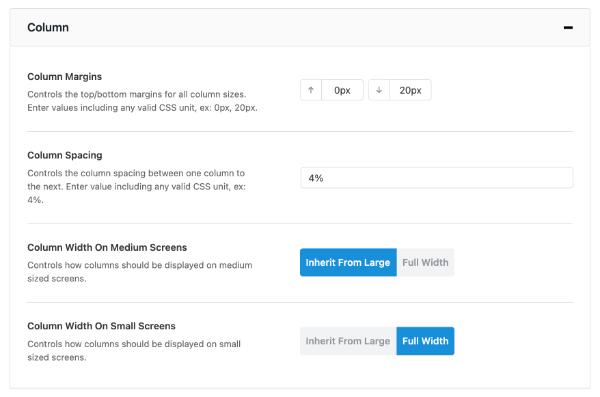 In the Avada theme options overview, you can see how to create and edit a Column element. To add a new column, just mouse over the Column controls and click the Add Column icon. This will display a select column dialog that will allow you to choose the layout of your new column. You can also change the column size by clicking on the Column Size icon.
Alternatively, you can set the Column element’s width as a percentage value. The default setting will use global settings that you can find under Options > Avada Builder Elements. You can customize this setting to the exact desired value.
Container element
The Container element in Avada theme options overview allows you to customize its style in the Avada dashboard. This element has four tabs, and each has several options. These tabs are broken down into logical categories, as shown below. The first tab relates to its visibility. This tab lets you choose whether the element is visible or hidden in the site.
The next tab focuses on the layout of the Container element. It controls the way that content and columns appear on a page. It is extremely powerful and can be used in many different layout scenarios.
WooCommerce compatibility
The Avada Theme integrates ninety-one design elements into its page builder, thereby reducing the need for external plugins. This helps the website load faster. However, this theme is too feature-rich for simple websites, and it isn’t compatible with most of the popular plugins. It is, however, compatible with the Elementor Page Builder.
The Avada theme is continuously updated with new features and is compatible with the latest version of WordPress. It also features a responsive design, allowing your website to work on different screen sizes. The theme also works with WooCommerce and is compatible with the Avalara plugin, which streamlines the tax management process for online stores. Avalara comes with a free trial, but you can also upgrade to the premium version for additional features and benefits.
WooCommerce compatibility of Avada Themes is an important feature to look for in a WordPress theme. Avada has been designed to be responsive and packed with options that make it an excellent choice for those who want complete control over the design of their site. It also supports WooCommerce, one of the most popular eCommerce plugins for WordPress. This plugin allows you to create an online store, sell products, and accept payments with ease.
Avada Pricing
The Avada theme is an excellent choice for anyone who wants a responsive, modern website that doesn’t require extensive technical knowledge. It is easy to install and comes with an intuitive dashboard. To download an Avada theme, all you need to do is fill out the required details, including a valid name, email address and payment. When setting up your website, you should also make sure to purchase a domain name. You can register one with a leading domain name provider and link it to a hosting space.
The Avada theme is extremely easy to customize, with plenty of advanced page options, extensive documentation, and a large range of font icons. In addition, it has a fully integrated Google map, which is an essential feature for any business website. Well worth the price!
All-In-One SEO Tool
Get Web Hosting
Learn Online Business


