

If you’re looking for an SEO tool that can help you optimize your YouTube videos, TubeBuddy is a great choice. It offers advanced analytics, video ideas, and an affiliate program. Learn how to install the TubeBuddy extension in Google Chrome and begin optimizing your videos right away! Here’s how to get started: First, you must sign in to your YouTube channel. After that, you can access TubeBuddy right within the YouTube interface.
TubeBuddy is a YouTube SEO tool
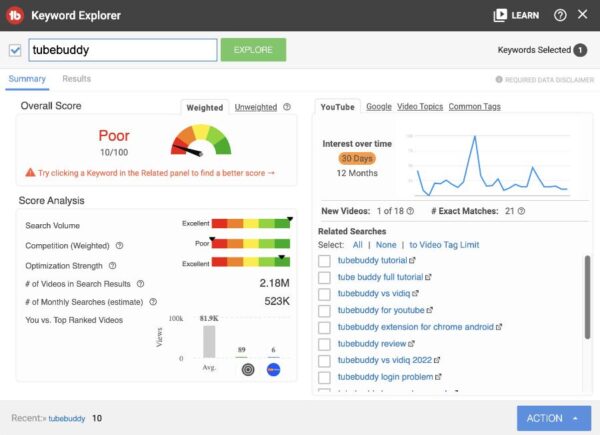
TubeBuddy is a YouTube SEO tool for Chrome that can be installed and used on all your videos. Its keyword explorer tool allows you to easily find keywords that will help you rank higher in search engines. This can lead to more views and better search results. It can also help your videos trend for a longer time.
TubeBuddy is a certified YouTube partner, which means that all its features conform to YouTube’s best practices. It is also used by some of the biggest YouTubers and recommended by top YouTube instructors. It offers a free plan that lets you try out its features before you make a commitment. However, the paid plans are only worthwhile if you plan to make money on YouTube.
Another great feature of TubeBuddy is its ability to keep track of your competitors. This tool allows you to see which videos are getting the most views and subscribers. You can even download an Excel report of your competitors’ channel stats for further analysis. TubeBuddy will also alert you whenever your competitors upload a video to YouTube.
It gives you advanced analytics
If you’re looking for a way to analyze your YouTube videos, you should install the TubeBuddy extension. This extension lets you see statistics on everything from views to video performance. It can help you determine the effectiveness of your video marketing efforts. With the help of this extension, you can improve your video’s visibility and reach on YouTube.
 TubeBuddy enables you to customize your canned responses to YouTube comments. Using this feature, you can respond to commenters much faster. This can be particularly useful if you get a lot of repetitive comments. The canned responses can also be customized to include your name.
For more advanced features, you can subscribe to the Legend or Star plans. The Legend plan costs $49 per month, but it includes everything from advanced scheduling to monetization and productivity tools. It also includes features for competitor analysis and search ranking tracking. Enterprise plans are also available if you’d like to analyze more than 20 channels. You can also enjoy a 20% discount if you pay for a full year of services upfront.
It gives you video ideas
If you’re in need of video ideas, TubeBuddy can help you out. It allows you to see what your subscribers are talking about, and it lets you add comments as suggestions. It also has a handy checklist feature so you don’t forget to do something. This can help you stay on top of your video marketing and help you create more interesting and unique content.
Another great feature of TubeBuddy is the advanced video embed page. You can customize the window and the content of your videos. With this, you can also optimize them for SEO. It can even help you add titles and descriptions with relevant keywords. This way, your videos will show up in search engines more often.
TubeBuddy also has card templates, which are similar to cards you might see in videos. They’re designed to draw the attention of viewers. They can also help you create polls, or link to related videos. You can even create your own cards by using TubeBuddy’s template.
It offers an affiliate program
TubeBuddy offers an affiliate program that will allow you to make money on your website or blog by promoting the company’s products and services. The affiliate program will pay out commissions based on the number of referrals that you generate. There are three levels of commissions: 30% for your first 50 referrals, 40% for those fifty and above, and 50% for referrals of 250 or more. TubeBuddy pays affiliates monthly, and recurring commissions are available.
To become a TubeBuddy affiliate, you’ll need to register for an account. Once you’re approved, you’ll receive a unique affiliate code that you can use on your website or blog. This code can be anything – your name, your YouTube channel name, or even a random URL. Once you have earned a certain amount, you can withdraw your commissions through PayPal.
TubeBuddy has a great affiliate program that pays 50% recurring commissions on sales. Affiliates can promote TubeBuddy on YouTube, on Twitter, or via paid advertisements. You can even make your own videos using the product to promote to your audience.
All-In-One SEO Tool
Get Web Hosting
Learn Online Business


