

If you want to optimize the speed of your Avada theme, you’ll need to configure the theme’s performance settings. Fortunately, Avada has a range of options you can adjust to improve its speed. For example, you can disable unused elements in the Avada builder and reset your Fusion Caches to increase your website’s speed.
Disable unused elements from the Avada builder
One of the best ways to make your website faster is to disable unused elements from the Avada builder. This is particularly important for mobile users, who are more likely to be on a metered network with slow connection speeds. Furthermore, removing unnecessary elements from your site makes both Google and your users happy. There are a number of options in the Avada builder that will enable you to disable elements that aren’t in use.
First, you can disable various post types. This will ensure that only those pages that are needed are rendered. This step will also help your site load faster, as disabled elements will not be rendered on any other pages. In addition, you can disable custom post types and form elements.
The Avada builder comes with a button called Run Element Scan that will scan your site for unused elements and help you reduce your site’s load times. However, the speed of your site will depend on your content and hosting. Moreover, extra plugins, images, and content are also a major factor in determining your site’s speed.
There are many options available with Avada, and this can be confusing if you’re not familiar with the options. But the benefit of Avada is that it is a powerful theme with a flexible builder. It can be used to build any type of WordPress website. It also comes with many pre-built demos and an easy-to-use visual drag-and-drop builder.
Reset Fusion Caches
One of the most popular WordPress themes is Avada by Theme Fusion. Whether you’re using this theme for your personal blog or a business site, you’ve probably heard that it’s very important to optimize its speed. Unfortunately, it’s not as easy as it sounds. You first have to install a caching plugin and then you have to reset your caches in order for the theme to work at its peak.
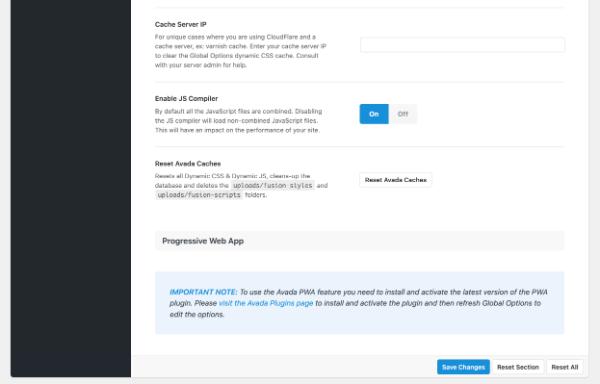 To reset your Avada theme’s caches, go to the Global Options page. Here, click the Reset Fusion Caches link. It will clean your Avada theme’s cache of Dynamic CSS and JS. You may also want to clear your browser’s cache. A browser’s cache stores images and websites. Clearing this cache can help your website load faster.
Once you’ve done that, you’ll be ready to modify individual posts, pages, and custom post types. The Avada theme offers several options to optimize each page or post, including the header, layout, and content area. Most of these options override global Avada theme settings.
Avada and Divi are great choices for building fast WordPress sites. With their media-rich layouts, they allow you to build a site that loads quickly. These themes have advanced features to make them even faster. However, it can be difficult to test the performance of these themes. A good way to get a feel for which theme will load faster is to use a testing plugin such as WPT Rocket. It’s also a good idea to check for server response times to see if your host is fast enough to handle your website.
Another great feature of Avada is the page builder integration. Fusion Builder Live is a great page builder and is integrated with Avada. While many people use the Avada theme, Divi is a popular all-in-one theme from Elegant Themes. Moreover, both themes have drag-and-drop page builders.
Customize theme speed optimization
If you are using the Avada theme, you can use performance settings to boost the speed of your website. The Performance Wizard is a new feature in Avada 7.4. It will guide you through a series of steps and let you choose what features to turn off or enable, ensuring that your website loads quickly. You can also customize these settings individually to suit your needs.
The first step is to disable any plugins that are responsible for lazy loading. In Avada, you can find these options in the Performance tab of your theme. Ensure that you have a high-quality hosting service and that your PHP version is updated. Additionally, you can use a plugin for minification to further boost your site’s speed.
The theme also comes with hooks and filters to make customization easy and efficient. It also supports translation, multiple columns, and a mobile header. Furthermore, it has advanced styling and performance scores that place it among the top themes on the WordPress market. The Pro version also comes with a sticky header feature, which allows you to display an extra header to visitors.
In order to determine if a theme is fast, you should measure its performance by comparing its total page size and total number of requests. Generally, a smaller total page size means fewer requests to download resources and a faster loading page. However, you should keep in mind that the GTmetrix score for a particular theme will vary.
Avada theme supports Fusion Builder, which is an easy-to-use drag-and-drop front-end page builder. It supports more than 60 design elements and includes all sorts of shortcodes. In addition, it comes with custom footers, 404 pages, and search pages.
The Avada theme is also responsive, so it will automatically adjust to different screen sizes. You can turn this feature off or on depending on the type of device you use. However, if you want to increase your site’s mobile compatibility, you can also use the Progressive Web App feature.
Avada is an affordable WordPress theme. Its features give you complete control of your site. With its options, you can change almost any aspect of its layout or functionality. Moreover, this theme is SEO optimized, so it works well with SEO plugins. Breadcrumbs are also supported in blog posts and pages, which can help you increase your site’s SEO performance.
All-In-One SEO Tool
Get Web Hosting
Learn Online Business


