

Whether you have just started advertising on Facebook, or you’ve been at it for a while, there are some important things you should know about the different types of ads you can run. These include targeted ads, image ads, video ads, and slideshow ads.
Image ads
Creating effective Facebook ad images is a key component of any social media marketing campaign. Images can grab attention, generate interest in your product or service, and provide a call to action.
The best Facebook ad images will be eye-catching, colorful, and catch the audience’s attention. However, not all images are created equal. Using complementary colors can help your ad stand out.
Images that draw attention and have a clear value proposition are the best. Contrasting colors can also attract attention. This is especially important for location-specific images, which are particularly powerful for local businesses.
A/B testing can help you determine the best image for your campaign. However, the process can be time-consuming. You may also have difficulty discerning user preferences. In addition, you may not be able to measure the difference between the two ad images you test.
The best Facebook ad images are ones that address the concerns of your targeted audience. If you want to increase your conversion rates, you’ll want to make sure you are addressing your customers’ pain points. By putting yourself in their shoes, you’ll be better able to communicate your product or service to them.
The best Facebook ad images may be ones that combine strong imagery with the right text. The best images may also include social proof, like a testimonial from a customer or celebrity. Using a well-crafted customer testimonial can be just as effective as a press mention.
If you are interested in combining your image with video, you can include a Facebook video in your ad. However, you must have a video that is at least 1080 pixels wide. A panoramic 360-degree image ad can also be used to showcase an event or physical store.
Video ads
Using video ads to run on Facebook can help drive more qualified traffic to your website and increase sales. However, you will need to make sure that your ads follow Facebook’s requirements.
Facebook video ads are designed to show off your brand and products, attracting viewers’ attention right away. They also allow you to build relationships with your followers. But before you upload your ad, you need to know what your objective is. A/B split testing can help you develop ads that resonate with your target audience.
Aside from visuals, your call to action should also be obvious. It could be an invitation to sign up for a newsletter or click through to your website. A good way to do this is by including a call to action button or mid-roll text overlay.
If you have a mobile audience, you can also optimize your video ads for mobile devices. Facebook recommends using a 4:5 aspect ratio for your video ads. This allows you to fill more of the screen space. Ideally, you want your video to be no longer than 12 seconds.
The first 10 seconds of your video ad can deliver 74% of its value. This is because your video can influence consumers’ decisions, nudge lost customers to return to your website, or drive more qualified traffic to your website.
The best Facebook video ads are those that engage and motivate viewers to take action. These can include app installs, purchasing products, or lead generation. It is also important to make sure that your video ad does not include offensive or illegal content. You cannot promote illegal content on Facebook.
Facebook’s retargeting feature can help you show video ads to consumers who have already visited your website or shown interest in your products. However, you will have to pay to show these ads to your audience.
Targeted ads
Whether you’re new to Facebook advertising or you’re looking for new ways to reach your target audience, there are many different ways to target your ads. The first step is to create an account with Facebook Business Manager. This allows you to create campaigns, set a budget and schedule ad campaigns. You can also use Facebook Ads Manager to track your campaigns and see how well they’re doing.
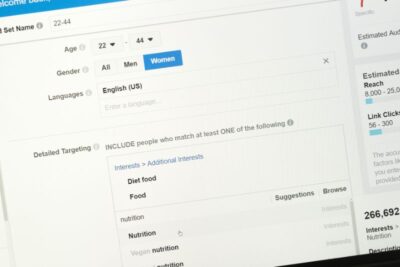 To start a new campaign, you need to set your objective. For example, you might want to drive traffic to your website or e-commerce store. Or you might want to reach local audiences. You can also set a daily budget, which is the maximum amount of money you can spend on your ads during a specific day.
When you create a new campaign, you’ll need to name it. It’s also important to indicate if your campaign fits into one of the special categories: politics, credit, or community.
You’ll need an editor role to create Facebook ads. You can also add ads to pages created by others. These ads have higher engagement metrics than static posts, but you need to create engaging content to catch people’s attention.
You can use the Connections setting to target people based on their connection to specific events or apps. You can also choose to exclude people who are connected to certain groups. This is particularly useful if you’re running a campaign for a brick-and-mortar store.
You can also create multi-product ads, which allow you to promote a range of products in a single ad campaign. For example, you can promote a product, a service, and a special offer in one ad. You can also use Slideshow Ads to demonstrate your products in a variety of contexts.
Slideshow ads
Creating Slideshow ads on Facebook is easy and efficient. They can be created with a combination of images, video, text, and music. They are a great choice for advertisers looking to save money while presenting their products or services in a visually engaging way.
The first step in creating a slideshow ad is to create a storyboard. This will help you decide the order in which images will appear. You will also need to think about the story that you want to tell. You will likely have an offer or an emotional trigger that you want to highlight.
You can use still images, videos, or stock photos to create a slideshow ad. It is possible to add text and music to your ad, but you will need to have legal rights to use them. You can also add special effects to your ad.
Slideshow ads on Facebook are a great way to increase brand awareness and drive offline store visits. They are a low-cost, high-impact ad format that plays on any internet speed. They use up to five times less data than a typical video ad, making them ideal for areas with slower connections.
You can create your own slideshow ads with Facebook’s Power Editor or Ads Manager. They are easy to create, play fast, and load quickly.
You can create your own slideshow ad by combining three to ten images, a single video, or a combination of images and videos. You can also include text, captions, and music. You can also add sound effects to your ad, and the ads are playable on Facebook’s video views.
Slideshow ads on Facebook are an excellent choice for advertisers with small budgets. They are easy to create, inexpensive to produce, and play beautifully on all internet speeds.
Analyze your ad campaign
Using Facebook ads can be an effective way to expand your market and boost your marketing campaign. You can use ad tracking tools to analyze your audience, measure the effectiveness of your ads, and determine if you’re reaching your target demographics. You can also use the platform to increase your ROI on your marketing efforts.
The best way to measure the effectiveness of your ads is to track their performance over time. You can do this by using a third-party dashboard tool to display important metrics.
Facebook Ads Manager is a useful tool for analyzing your ad campaigns. It offers a variety of reports and analytics, as well as historical data. You can also save the most important metrics to your custom presets.
Facebook Ads Manager also has a tool for making side-by-side comparisons. It allows you to compare your campaigns, ad sets, and individual ads. It also offers visual charts to help you compare performance and identify trends.
The most important metrics for measuring Facebook ad success are cost per mille (CPM), reach, frequency, and the link CTR. The CPM metric helps you measure pricing fluctuations. The link CTR metric measures the number of clicks that your links receive. It compares the number of link clicks to the total number of people who saw your ad.
The best Facebook ad tracking tools also allow you to create custom reports, integrate data from other sources, and make the most of your marketing dollars. Whether you’re a small business or a major brand, you can use Facebook to increase ROI on your marketing efforts.
The best Facebook ad tracking tool for you depends on your goals. For instance, if you want to run eCommerce campaigns, you can directly measure ROAS.
All-In-One SEO Tool
Get Web Hosting
Learn Online Business


